How to auto-refresh OAuth 2.0/Bearer token in Postman (Keycloak example)

Context

I am setting up Keycloak for a pet project and for automation purposes I wanted to use their Admin REST API. It took me a bit of time to find out how to get the token for authorization and then I was surprised that Postman does not offer an off-the-shelf auto-refresh solution. As Keycloak tokens expire after 1 min, I realized I had to find a solution for testing.

After digging a bit I found that this could be solved easily with Pre-request scripts. Postman gives the option to execute Javascript pre- and post-request and using javascript it is possible to call the authorization endpoint and save the token.

In my example, I am applying the script for a folder, meaning that every request in that folder will execute it when required (sidenote: make sure you save your folder before you try! I spent quite some time debugging why it doesn’t work when it just wasn’t saved).

Preparation

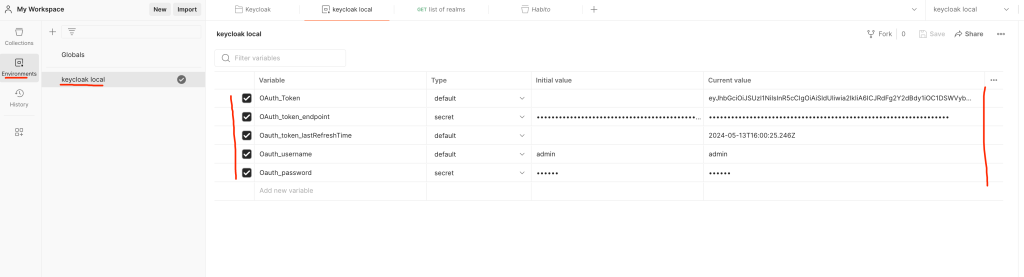
The only thing you need to prepare is an environment in Postman and define five variables in it

OAuth_TokenNo need to define. Will store the actual token which will be referred to during authorization.
OAuth_token_endpointThe endpoint where the token is refreshed.
Oauth_token_lastRefreshTimeTimestamp of when the token was last refreshed.
Oauth_usernameIn my example, I needed a username and password to get the token and for best practice, I stored them as environment variables.
Oauth_password
Environment variables and their description

How-to

Setup auto-refresh

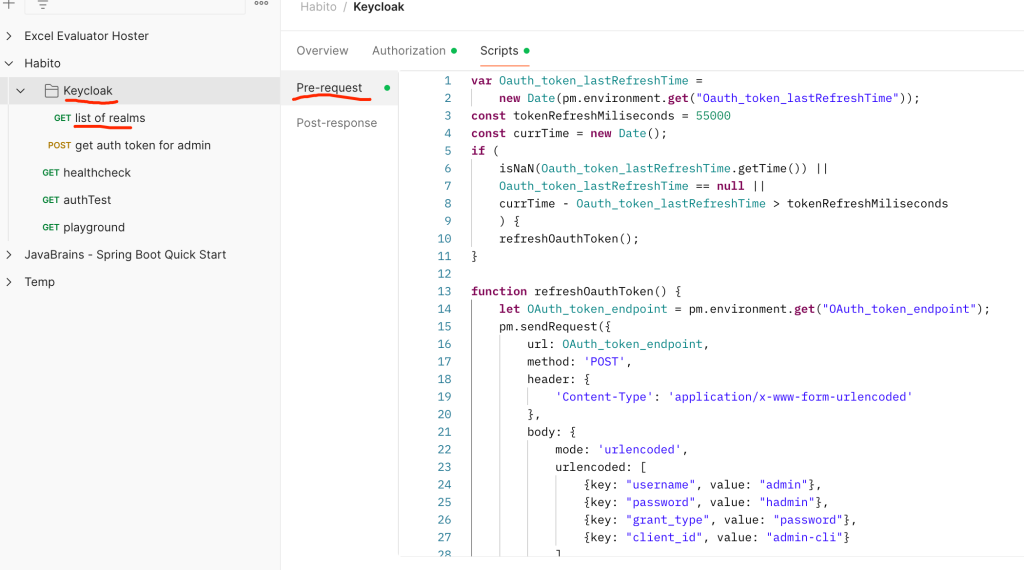
I have a folder called Keycloak (of course, in your example you can have any folder) and inside that folder I have a request called list-of realms. In the Pre-request part, add the following Javascript code:

var Oauth_token_lastRefreshTime = 
    new Date(pm.environment.get("Oauth_token_lastRefreshTime"));
const tokenRefreshMiliseconds = 55000
const currTime = new Date(); 
if (
    isNaN(Oauth_token_lastRefreshTime.getTime()) || 
    Oauth_token_lastRefreshTime == null ||
    currTime - Oauth_token_lastRefreshTime > tokenRefreshMiliseconds
    ) {
    refreshOauthToken();
}

function refreshOauthToken() {
    let OAuth_token_endpoint = pm.environment.get("OAuth_token_endpoint");
    let Oauth_username = pm.environment.get("Oauth_username");
    let Oauth_password = pm.environment.get("Oauth_password");
    pm.sendRequest({
        url: OAuth_token_endpoint,
        method: 'POST',
        header: {
            'Content-Type': 'application/x-www-form-urlencoded'
        },
        body: {
            mode: 'urlencoded',
            urlencoded: [
                {key: "username", value: Oauth_username},
                {key: "password", value: Oauth_password},
                {key: "grant_type", value: "password"},
                {key: "client_id", value: "admin-cli"}
            ]
        }
    }, function (err, res) {
        if (err) {
            console.log(err);
        } else {
            pm.environment.set("OAuth_Token", res.json().access_token);
            pm.environment.set("Oauth_token_lastRefreshTime",currTime);
        }
    });
}

This code

  • gets the last time of refresh from env. variable
  • if it’s empty, not a date, or older than 55.000 ms (55 sec), it refreshes the token
    • gets the endpoint from env. variable
    • calls the auth endpoint with the required headers and the body
    • saves the token to an env. variable

Setup authorization

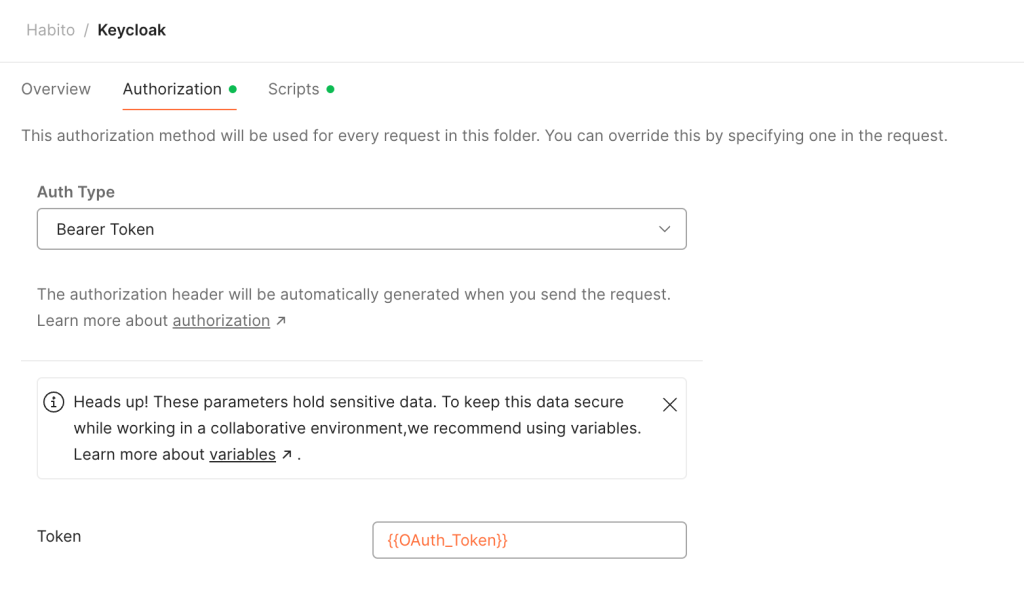
This is quite simple, select the Bearer token, and for the token itself, refer to the environment variable as {{OAuth_Token}}. Keep in mind, that if you are doing how I did it (defining it on the folder level), then in the request itself you need to define authorization as “inherit Auth from parent“.
How to test

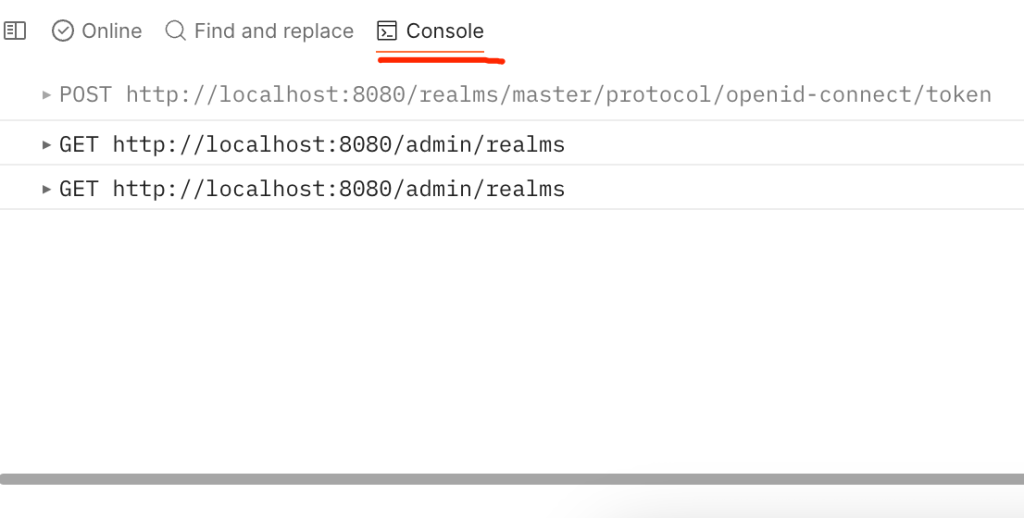
In the console (bottom-left in Postman) you can see the outgoing requests. I called the /realms endpoint twice: the first time it triggered the token refresh before the call itself, and the second time it didn’t refresh it at all. If it doesn’t work for any reason, you can use the arrow to open the request for more details.

Continue ReadingHow to auto-refresh OAuth 2.0/Bearer token in Postman (Keycloak example)

RTJ3: Smaller things

The biggest help that I got from my company is that they helped me identify a pet project which is small enough to make sense, but complex enough to help me learn. In general, it uploads, exposes some files, and later modifies them via an open-source library. This enables me to learn in a way that I know what I want to build and I learn what I need for the next chapter. I will share here where the guides that helped me a lot.

Accessing data with MySQL
(or how to use MySQL with Spring)

It took me some time to understand that I don’t actually need to write the queries myself but JPA will take care of it and I only have to care for the data model (this is simplification, for sure). My thinking before was that it must work in a way that I have to construct the query as any spring (like “select version from excel_file where uuid=\”” + result.uuid + “\;”).

To make this work, I had to figure out how to host a MySQL server using docker. Here, ChatGPT and some googling walked me through and now I am a happy user of that database.

Right now, my structure is very simple, it is only one tab, but it does do the job:

Handling Form Submission
(or how to create/host an HTML page in Java)

I learned here about Thymeleaf and controllers how to create a simple form, and how to connect it to a template and access it from the browser. The pet project I am working on is more backend-facing and the UI is only the backup, I did not focus too much on this, I built a generic template with error handling. It was still useful to understand how these are connected conceptually.


Continue ReadingRTJ3: Smaller things

RTJ2: Intro to Spring Boot

There is a demo project that I can build for the company that I work for. This is great because it gives learning purpose and sets a direction. At the end of the previous course, I felt increasingly impatient as I was looking forward to starting to build this application.

So far, I’ve only built an application that opened, executed commands sequentially, and then closed. I had no idea how to host an application that listens to requests, runs in the background waits for actions to happen, and interacts based on those actions. I felt very confident that if I had something like this running with a Hello World then I could figure out the rest.

I asked one of my team members to help me out and help me expose a /hello endpoint and return a world response. I shared the screen, and he helped me, but I saw things I had not seen before: what the hell are annotations? What are these random values I have to put somewhere like springapplication.run?

I felt overwhelmed and I realized that there is a layer I could not imagine before. I give it a day’s rest – the next day with fresh energy I decided I needed some introduction to Spring. For now, one of the more reliable forms of getting a recommendation is to google something like “spring boot tutorial course + Reddit + r/learnjava”. This is how I found the JavaBrains introduction to Spring Boot intro course.

This course starts at the beginning of Spring and explains why it was built and what are the benefits of using it, and typical use cases. Then it takes your hand and builds a rest API exposing HTTP services for managing different courses (create, edit, list, filter).

This was the first time I relied purely on video training and the experience was mixed. Firstly, it is difficult for me to focus on a video without pressing the right arrow and skipping 5 seconds : – ) Secondly, if you are stuck there is not a lot of help out there. The video series is well structured (most videos are around 5 minutes, with the longest being 15 and it is easy to follow. There was not a single time I could not repeat what the guy did.

It’s a way to start: I am not an expert but I started from nowhere and I have some understanding (enough to keep hustling on the training project). I do recommend it if you want to understand Spring as a beginner.

Continue ReadingRTJ2: Intro to Spring Boot